介绍如何从huggingface下载模型,如何使用API调用huggingface模型的在线服务,以及如何本地运行模型推理服务。
一. 使用API调用Huggingface 在线服务。
通过post向huggingface发送请求, 代码如下:1
2
3
4
5
6
7
8
9import requests
# 通过post调用huggingface的在线模型
API_URL = "https://api-inference.huggingface.co/models/uer/gpt2-distil-chinese-cluecorpussmall"
API_TOKEN = "hf_xxxxxxxxxxx" # 从官网申请API_TOKEN
headers = {"Authorization": f"Bearer {API_TOKEN}"}
# 不使用token,匿名访问
response = requests.post(API_URL, headers=headers, json = {"inputs":"你好,huggingface"})
print(response.json())
其中API_TOKEN要从官网申请
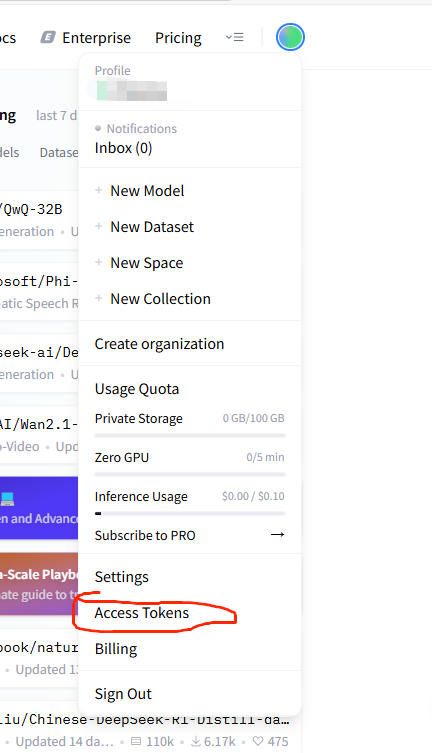
点击Access Token, 然后进入申请,里面的权限全选即可。
二. 从huggingface上拉取模型
首先创建python虚拟环境,如果没有安装Anaconda,可以参考
Windows下的Anaconda详细安装教程_windows安装anaconda-CSDN博客
pip 安装huggingface,transformers
1 | pip install huggingface_hub |
从https://huggingface.co/ 上查找对应的模型,然后用如下命令下载, 比如要下载模型gpt2-chinese-cluecorpussmall到当前目录下的 ./gpt2-chinese-cluecorpussmall,则用如下命令:
1 | huggingface-cli download --resume-download Qwen/Qwen2.5-0.5B-Instruct --local-dir Qwen2.5-0.5B-Instruct |
下载数据集用如下命令:
1 | huggingface-cli download --repo-type dataset lavita/medical-qa-shared-task-v1-toy --local-dir edical-qa-shared-task-v1-toy |
注意: 从huggingface上下载需要科学上网
如果没有科学上网,可以从huggingface的国内镜像下载(笔者常用,推荐)
下载前先设置环境变量
windows
1 | env:HF_ENDPOINT = "https://hf-mirror.com" |
linux
1 | export HF_ENDPOINT=https://hf-mirror.com |
下载模型
1 | huggingface-cli download --resume-download gpt2 --local-dir gpt2 |
下载数据集
1 | huggingface-cli download --repo-type dataset --resume-download wikitext --local-dir wikitext |
三. 本地运行模型
下载好模型后,使用transformers运行模型, 目前大模型可以简单分为两类: Bert类和GPT类,Bert类常用于词嵌入,分类,情感识别等,GPT类用于生成。
3.1 Bert类
1 | from transformers import BertTokenizer, BertForSequenceClassification, pipeline |
3.2 GPT 类
1 | from transformers import AutoModelForCausalLM, AutoTokenizer, pipeline |